Agentic Routing on AMD ROCm



Most agent systems start with a simple idea: call model: auto and let the
inference layer pick the right model. That is useful, but it is not enough for
long-running agents.
A coding agent can begin with architecture work, call tools, receive short tool outputs, continue with "fix that", then ask a privacy-sensitive question in the same user session. The latest message may look simple, but the route cannot be chosen from the latest message alone. The router also has to know whether this is a safe moment to switch models.
This guide shows how to deploy that pattern on AMD ROCm with vLLM Semantic Router. You will start one ROCm vLLM backend, serve the agentic routing recipe, open the dashboard, validate the OpenAI-compatible API, and use Inferoa to experience route decisions and Router Learning behavior from an agent client.
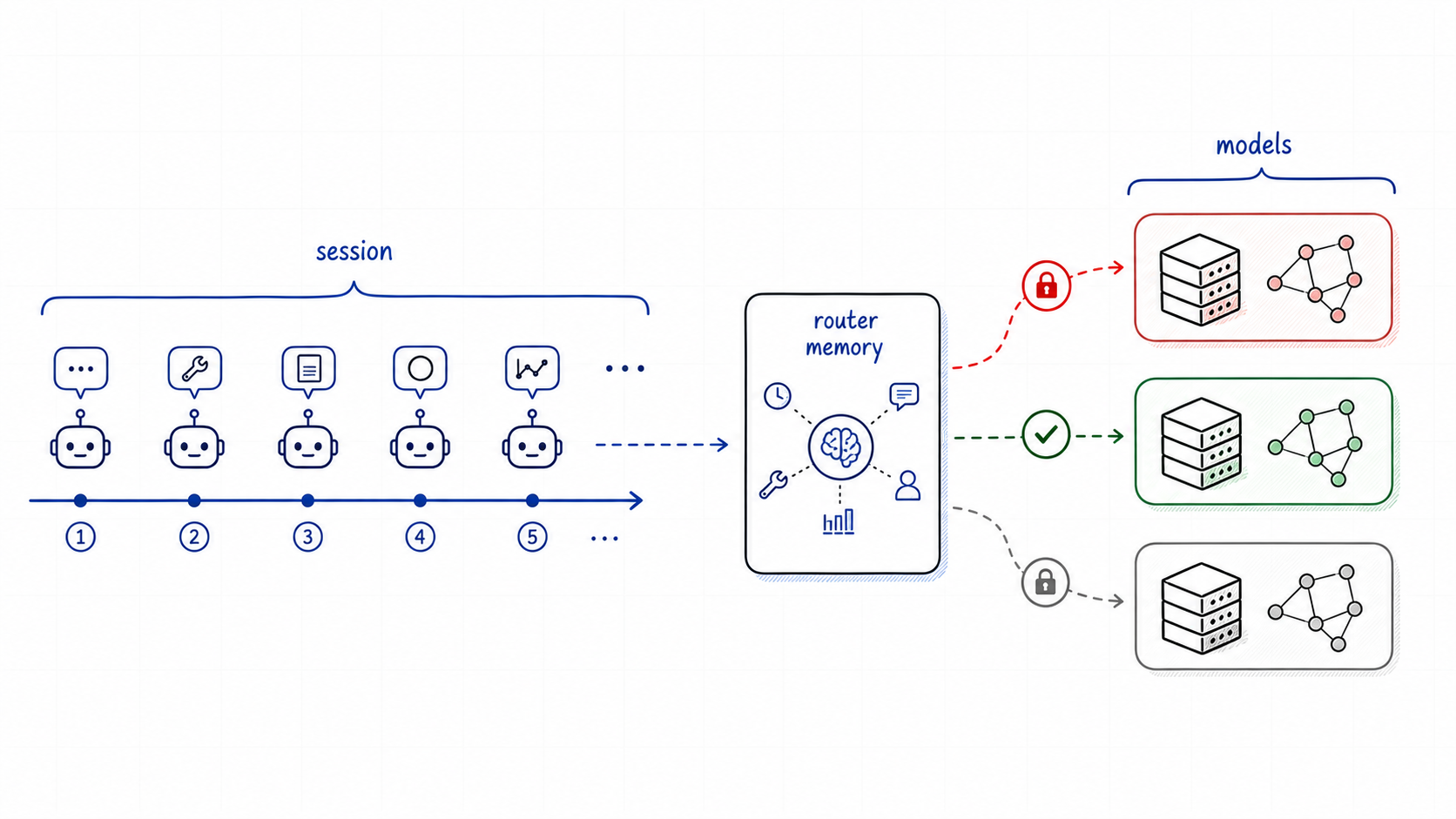
Agentic routing is not only choosing a model. It is choosing when to keep one.
The reference recipe is deploy/recipes/agentic-saars.yaml. It is designed to be runnable on a single MI300X-class AMD ROCm host while exercising the same routing shape you would use with a heterogeneous fleet.
What You Will Deploy
This guide follows the same deployment style as the earlier AMD Developer Cloud walkthrough: start the ROCm backend first, then run vLLM Semantic Router in front of it.
| Component | Endpoint | Purpose |
|---|---|---|
| ROCm vLLM backend | http://<host>:8090/v1 | Serves Qwen/Qwen3.6-35B-A3B and exposes the logical model aliases used by the recipe. |
| Envoy router API | http://<host>:8899/v1 | OpenAI-compatible endpoint for agents and SDKs. |
| Router dashboard | http://<host>:8700 | Imports the recipe, shows replay, topology, playground, and route inspection. |
| Recipe | deploy/recipes/agentic-saars.yaml | Encodes simple, complex, privacy, domain, and agentic Router Learning policy. |
| Inferoa | github.com/agentic-in/inferoa | Optional agent client with native vLLM-SR route, learning, cache, and token visibility. |
The fastest remote development setup is to expose the API and dashboard ports directly from the AMD host. If those ports are not open, use an SSH tunnel from your local machine:
ssh -L 8899:localhost:8899 -L 8700:localhost:8700 root@<host>
Then use http://localhost:8899/v1 and http://localhost:8700 locally.
What This Recipe Expresses
The recipe has four route families plus a local fallback:
| Request shape | Example decision | Selected model alias | Expected route behavior |
|---|---|---|---|
| Simple factual or math work | simple_math_fast_path, simple_general | qwen/qwen3.6-rocm | Use the simple local AMD vLLM path. |
| Medium general or business analysis | medium_general, domain_business | google/gemini-2.5-flash-lite | Use a lower-cost general lane for non-private work that needs more than a short answer. |
| Complex reasoning, architecture, STEM, or hard coding | domain_code_complex, domain_stem_research, complex_general | google/gemini-3.1-pro, with openai/gpt5.4 as the stronger alternative in multi-model refs | Use a stronger reasoning lane when the difficulty signal is high. |
| Legal, compliance, or health analysis | domain_legal_health | anthropic/claude-opus-4.6 | Use the high-care domain lane when the prompt is non-private and domain-specific. |
| Privacy-sensitive content, credentials, internal docs, or PII-like data | local_privacy_policy | qwen/qwen3.6-rocm | Stay on the local AMD model and bypass learning. |
| Prompt-injection or security containment | local_security_containment | qwen/qwen3.6-rocm | Keep suspicious or local-only traffic on the local AMD lane. |
| Anything unmatched | default_general | qwen/qwen3.6-rocm | Fall back to the local AMD lane. |
In the reference deployment, those paths are represented by logical model names
such as qwen/qwen3.6-rocm, google/gemini-2.5-flash-lite,
google/gemini-3.1-pro, openai/gpt5.4, and
anthropic/claude-opus-4.6. For a single-card AMD guide, they can all point at
the same vLLM backend. That is intentional: it lets you validate routing policy,
headers, replay, and learning behavior without needing five physical model
deployments.
The routing behavior still matters. If a request contains an API key, the privacy decision should route locally because the content is sensitive, not because the user remembered to write "keep this local." If a request moves from simple math to hard code review, the selected decision should change. If a tool loop is active, learning should be able to pin the current model even when the base semantic route would otherwise drift.
Why Router Learning Sits After Routing
Semantic routing answers:
What route best matches this request?
Router Learning answers a second question:
Given the current session or conversation, should we accept that route change right now?
That separation is the key design point. The base decision remains semantic: simple, complex, privacy, and domain signals still choose candidate routes. Router Learning then applies operational memory: previous model, active tool loop, session or conversation identity, idle timeout, switch history, and prefix cache evidence.
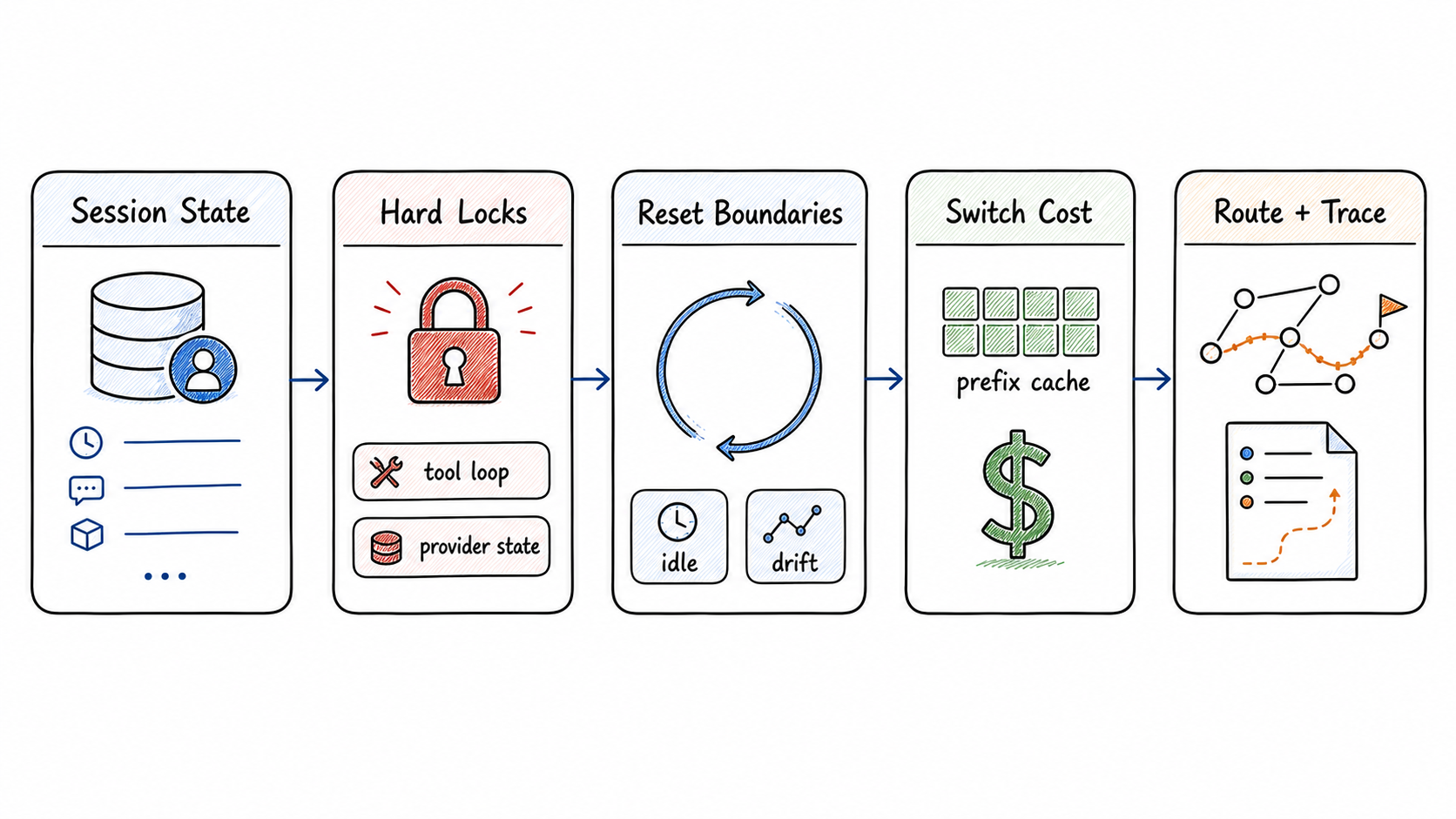
Router Learning adjusts the selected route with continuity, reset, cache, and trace policy.
The compact response header surface is method-keyed so more adaptations can be added later:
x-vsr-learning-methods: session_aware
x-vsr-learning-actions: session_aware=hard_lock
x-vsr-learning-scopes: session_aware=conversation
x-vsr-learning-reasons: session_aware=hard_lock=tool_loop
x-vsr-learning-modes: session_aware=apply
Use those headers for live client display. Use x-vsr-replay-id for the full
trace: base selected model, final selected model, matched decision, cache
evidence, and the stay-vs-switch reasoning.
Conversation Protect vs Session Protect
The recipe defaults to conversation-level protection:
global:
  router:
    learning:
      enabled: true
      adaptations:
        session_aware:
          enabled: true
          scope: conversation
          identity:
            headers:
              session: x-session-id
              conversation: x-conversation-id
Use scope: conversation when one agent run should stay stable, but a later
run in the same application session should be allowed to route again. In this
guide, x-conversation-id maps to an agent run, while x-session-id maps to
the broader user or client session.
For stricter products, change only the scope:
global:
  router:
    learning:
      adaptations:
        session_aware:
          scope: session
With scope: session, the first selected model can be protected across
multiple conversations until the idle timeout resets the session or a decision
explicitly bypasses learning.
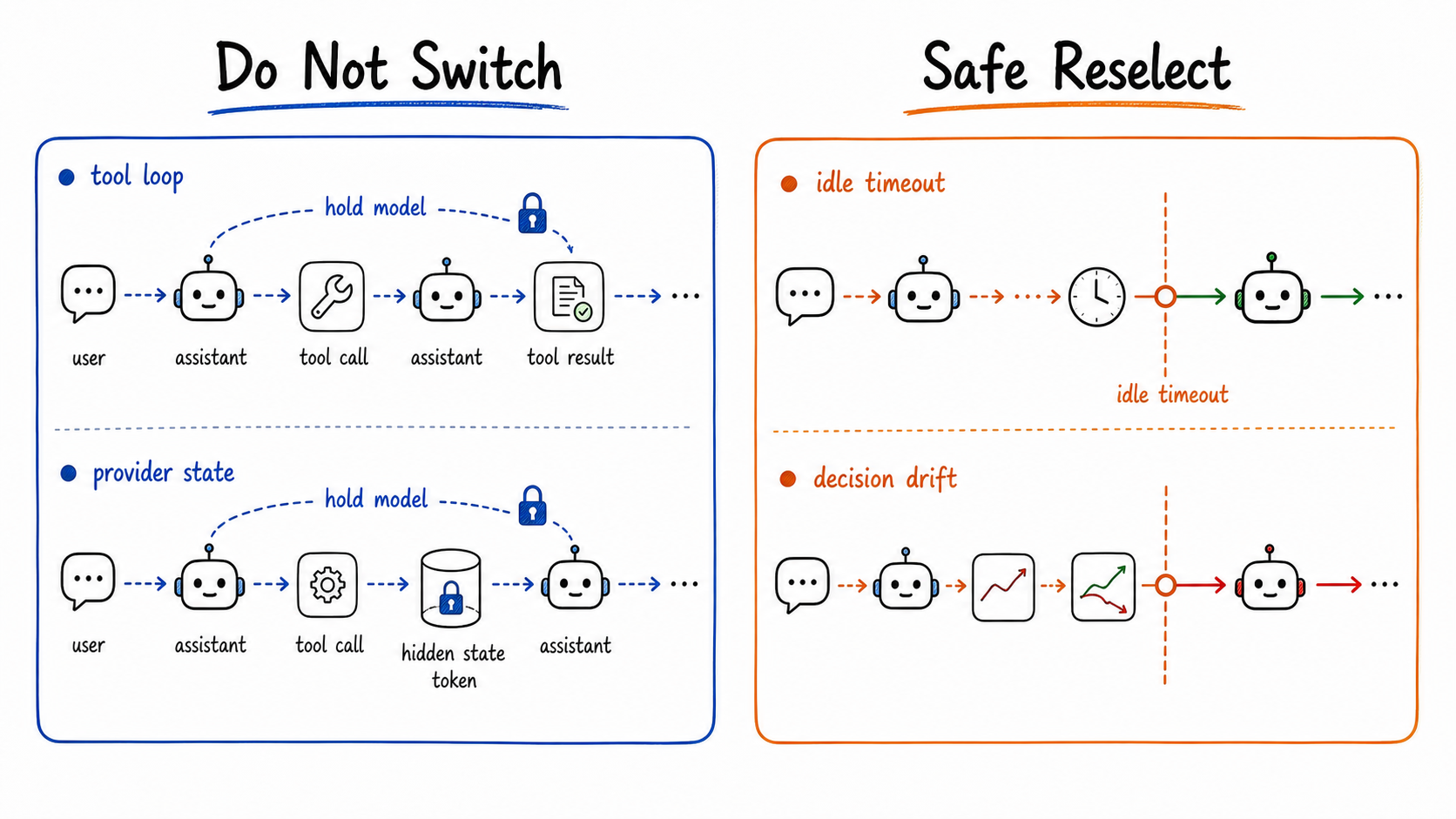
Conversation protect keeps one run stable. Session protect can hold a model across runs.
Privacy and security routes should normally bypass learning so policy remains hard:
routing:
  decisions:
    - name: local_privacy_policy
      modelRefs:
        - model: qwen/qwen3.6-rocm
      adaptations:
        session_aware:
          mode: bypass
That gives the router a clean rule: learning can protect continuity, but it does not soften a privacy boundary.
Prepare The AMD Host
Before starting containers, make sure the AMD host has:
- an AMD ROCm-capable GPU instance, such as a single MI300X-class machine
- Docker installed and the daemon running
- access to
/dev/kfdand/dev/dri - enough disk for the model cache
- a Hugging Face token if your environment needs one for model download
- ports
8090,8899, and8700reachable, or an SSH tunnel for them
Install vLLM Semantic Router the same way as the AMD Developer Cloud guide:
python3.12 -m venv vsr
source vsr/bin/activate
curl -fsSL https://vllm-semantic-router.com/install.sh | bash

vllm-sr --help
Create the shared Docker network used by the recipe. The router container will
reach the backend by the Docker name vllm:
sudo docker network create vllm-sr-network 2>/dev/null || true
Start vLLM on AMD ROCm
Use the official vLLM ROCm OpenAI-compatible image. The current
vLLM Docker documentation
lists vllm/vllm-openai-rocm as the ROCm serving image.
sudo docker run -d \
  --name vllm \
  --network=vllm-sr-network \
  --restart unless-stopped \
  -p "${VLLM_PORT_QWEN36:-8090}:8000" \
  -v "${VLLM_HF_CACHE:-/mnt/data/huggingface-cache}:/root/.cache/huggingface" \
  --device=/dev/kfd \
  --device=/dev/dri \
  --group-add=video \
  --ipc=host \
  --cap-add=SYS_PTRACE \
  --security-opt seccomp=unconfined \
  --shm-size 32G \
  -e HF_TOKEN="${HF_TOKEN:-}" \
  -e VLLM_ROCM_USE_AITER=1 \
  -e VLLM_USE_AITER_UNIFIED_ATTENTION=1 \
  -e VLLM_ROCM_USE_AITER_MHA=0 \
  --entrypoint python3 \
  vllm/vllm-openai-rocm:latest \
  -m vllm.entrypoints.openai.api_server \
    --model Qwen/Qwen3.6-35B-A3B \
    --host 0.0.0.0 \
    --port 8000 \
    --enable-auto-tool-choice \
    --tool-call-parser qwen3_coder \
    --served-model-name qwen/qwen3.6-rocm google/gemini-2.5-flash-lite google/gemini-3.1-pro openai/gpt5.4 anthropic/claude-opus-4.6 \
    --trust-remote-code \
    --reasoning-parser qwen3 \
    --max-model-len 262144 \
    --language-model-only \
    --max-num-seqs 32 \
    --enable-prefix-caching \
    --enable-prompt-tokens-details \
    --prefix-caching-hash-algo sha256 \
    --kv-cache-dtype fp8 \
    --gpu-memory-utilization 0.90
The multiple --served-model-name aliases let one ROCm backend simulate a
model portfolio. In a production fleet, those aliases can point at different
local vLLM backends, private endpoints, or provider gateways.
Check the backend before starting the router:
curl -s "http://localhost:${VLLM_PORT_QWEN36:-8090}/v1/models" | jq .

sudo docker logs vllm 2>&1 | \
  grep -Ei 'prefix cache|kv cache|maximum concurrency|iteration' | tail -40
If your vLLM build does not populate usage.prompt_tokens_details.cached_tokens
for OpenAI-compatible responses, keep --enable-prefix-caching enabled and
validate cache behavior through /metrics instead:
curl -s "http://localhost:${VLLM_PORT_QWEN36:-8090}/metrics" \
  | grep -E 'prefix_cache|prompt_tokens_cached|kv_cache' \
  | head
Start vLLM Semantic Router With The Recipe
Download the published recipe and serve it with the installed CLI:
curl -L -o agentic-saars.yaml \
  https://raw.githubusercontent.com/vllm-project/semantic-router/main/deploy/recipes/agentic-saars.yaml

vllm-sr serve \
  --platform amd \
  --config agentic-saars.yaml
The recipe exposes the OpenAI-compatible router through Envoy:
http://<host>:8899/v1
The dashboard is available at:
http://<host>:8700
The vLLM backend in the example is reachable at:
http://<host>:8090
Confirm that the router is ready:
curl -s http://<host>:8899/v1/models | jq .
Open the dashboard at http://<host>:8700. If you are using the dashboard
onboarding flow instead of the CLI command above, import the recipe from:
https://raw.githubusercontent.com/vllm-project/semantic-router/main/deploy/recipes/agentic-saars.yaml
That gives you the same routing policy in the dashboard playground, replay viewer, and topology view.
Smoke Test The Route Families
Every request should send both identity headers:
curl -s http://<host>:8899/v1/chat/completions \
  -D /tmp/agentic-route.headers \
  -H 'content-type: application/json' \
  -H 'x-session-id: demo-session' \
  -H 'x-conversation-id: demo-run-simple' \
  -d '{
    "model": "auto",
    "messages": [
      {"role": "user", "content": "What is 17 * 23? Answer with only the number."}
    ]
  }'

grep -i '^x-vsr-' /tmp/agentic-route.headers
Expected shape:
x-vsr-selected-model: qwen/qwen3.6-rocm
x-vsr-selected-decision: simple_math_fast_path
x-vsr-learning-actions: session_aware=select
x-vsr-learning-scopes: session_aware=conversation
Try a privacy request:
curl -s http://<host>:8899/v1/chat/completions \
  -D /tmp/agentic-privacy.headers \
  -H 'content-type: application/json' \
  -H 'x-session-id: demo-session' \
  -H 'x-conversation-id: demo-run-private' \
  -d '{
    "model": "auto",
    "messages": [
      {"role": "user", "content": "My API key is sk_live_123456. Is it safe to paste this into a public issue?"}
    ]
  }'

grep -i '^x-vsr-' /tmp/agentic-privacy.headers
Expected shape:
x-vsr-selected-model: qwen/qwen3.6-rocm
x-vsr-selected-decision: local_privacy_policy
x-vsr-learning-actions: session_aware=bypass
For domain routes, use prompts that naturally carry the domain signal, such as
legal/health analysis for domain_legal_health, architecture or difficult code
work for domain_code_complex, and research synthesis for
domain_stem_research.
Try It From Inferoa
Inferoa is an inference-native agent
harness for long-running coding and tool loops. It has native integration with
vLLM Semantic Router: when INFEROA_MODE=auto is enabled, the TUI reads vLLM-SR
response headers and shows the selected model, selected decision, Router
Learning action, cache evidence, and token pressure directly in the agent
session. The docs are available at
inferoa.agentic-in.ai.
Install the current dev build:
npm install -g inferoa@dev
inferoa --help
Point Inferoa at the router endpoint. INFEROA_MODE=auto tells Inferoa to send
requests through vLLM Semantic Router and preserve the route metadata it sees
in response headers:
export INFEROA_BASE_URL=http://<host>:8899/v1
export INFEROA_MODEL=auto
export INFEROA_MODE=auto
Start a session:
inferoa
Ask the same route-family prompts you used in the smoke tests. The footer shows the active endpoint mode, selected model, selected decision, and Router Learning state. For example, privacy traffic should show the local model and a learning bypass, while tool-heavy follow-ups can show a hard lock or stay action when Router Learning protects the current run.
Inside the TUI, open tokenmaxxing views for details:
/tokenmaxxing
/tokenmaxxing signals
/tokenmaxxing summarizes turns, selected models, model changes, cache status,
tool-loop state, RTK savings, and latency. /tokenmaxxing signals shows the
lower-level route and learning evidence for each turn, including action,
reason, scope, selected model, selected decision, and replay id when present.
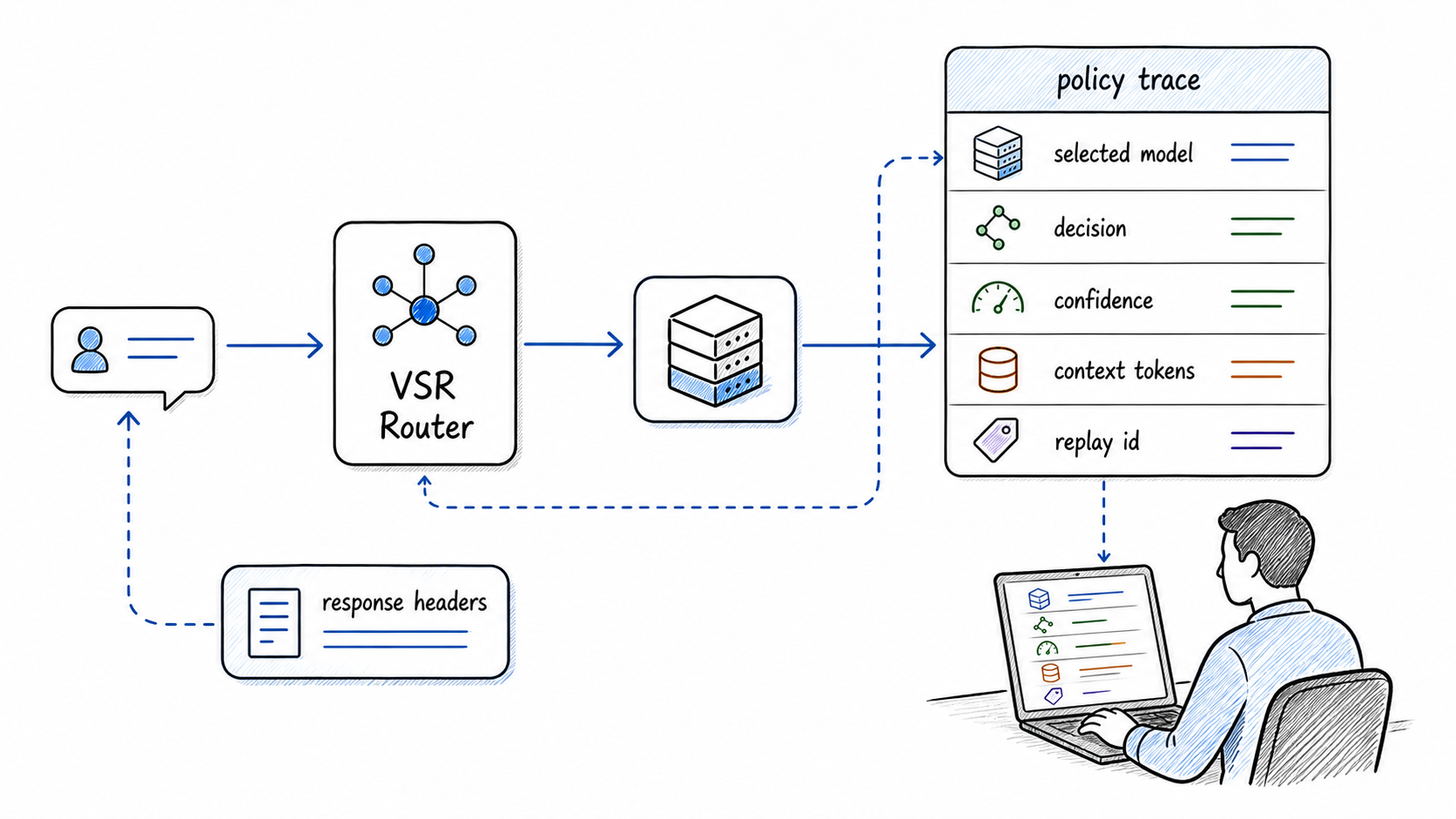
Auto routing should be inspectable: selected model, decision, learning action, and replay id.
Read Cost and Cache Results Carefully
Cost savings come from two places:
- The base route avoids sending every request to the strongest path.
- Router Learning avoids unnecessary switches that would discard continuity or prefix locality.
The earlier SAAR validation for the same session-aware mechanism reported a 78.71% estimated physical-model cost reduction across 21,600 deterministic turns, mostly by preventing unsafe or low-value switches. In this AMD guide, the absolute dollar number depends on the logical model prices you configure and whether the backend exposes cached-token evidence. The useful thing to inspect is the direction: simple and privacy routes should avoid expensive lanes, while long warm agent runs should not switch for tiny score differences.
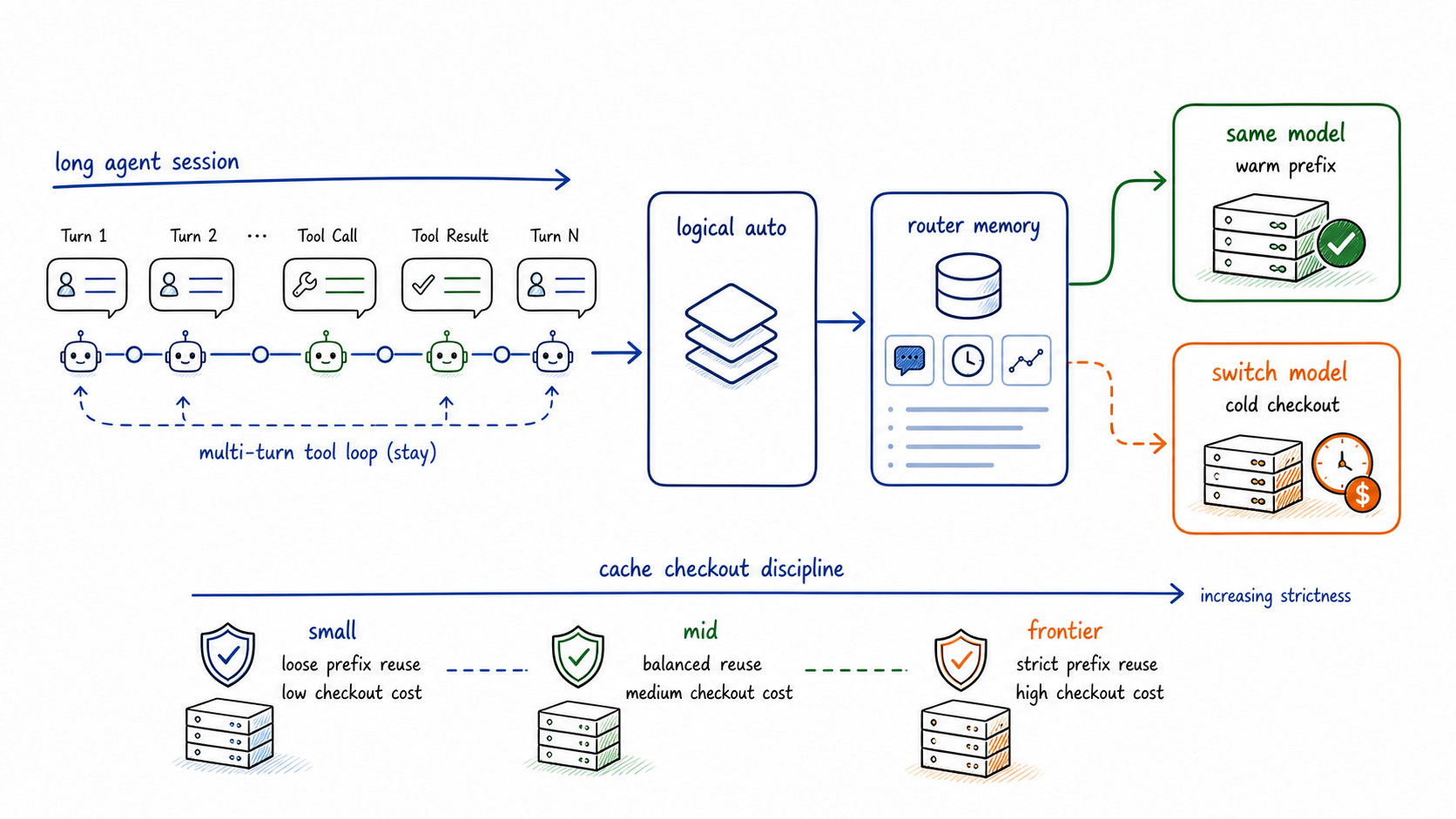
Switching away from a warm long-running agent can be more expensive than the latest short prompt suggests.
Inferoa can surface token pressure, cache evidence, and model changes while you work. Treat those signals as routing telemetry, not a billing statement. Router Replay is the source of truth for why a route stayed, switched, hard-locked, or bypassed learning.
A Minimal Validation Checklist
Before connecting a local agent to http://<host>:8899/v1, check these:
| Check | What to look for |
|---|---|
| Router endpoint | curl http://<host>:8899/v1/models returns the logical models. |
| Dashboard | http://<host>:8700 opens and shows live router state. |
| Simple route | x-vsr-selected-decision: simple_math_fast_path and local model. |
| Privacy route | local_privacy_policy, local model, session_aware=bypass. |
| Domain route | Matching domain decision such as domain_code_complex or domain_stem_research. |
| Conversation protect | New conversation can re-route under scope: conversation. |
| Session protect | New conversation stays on the first model under scope: session. |
| Tool-loop protect | Tool-result turns emit hard_lock with reason tool_loop. |
| Replay | x-vsr-replay-id resolves to a Router Replay record. |
| Prefix cache | vLLM /metrics shows prefix cache or KV-cache counters changing under repeated-prefix traffic. |
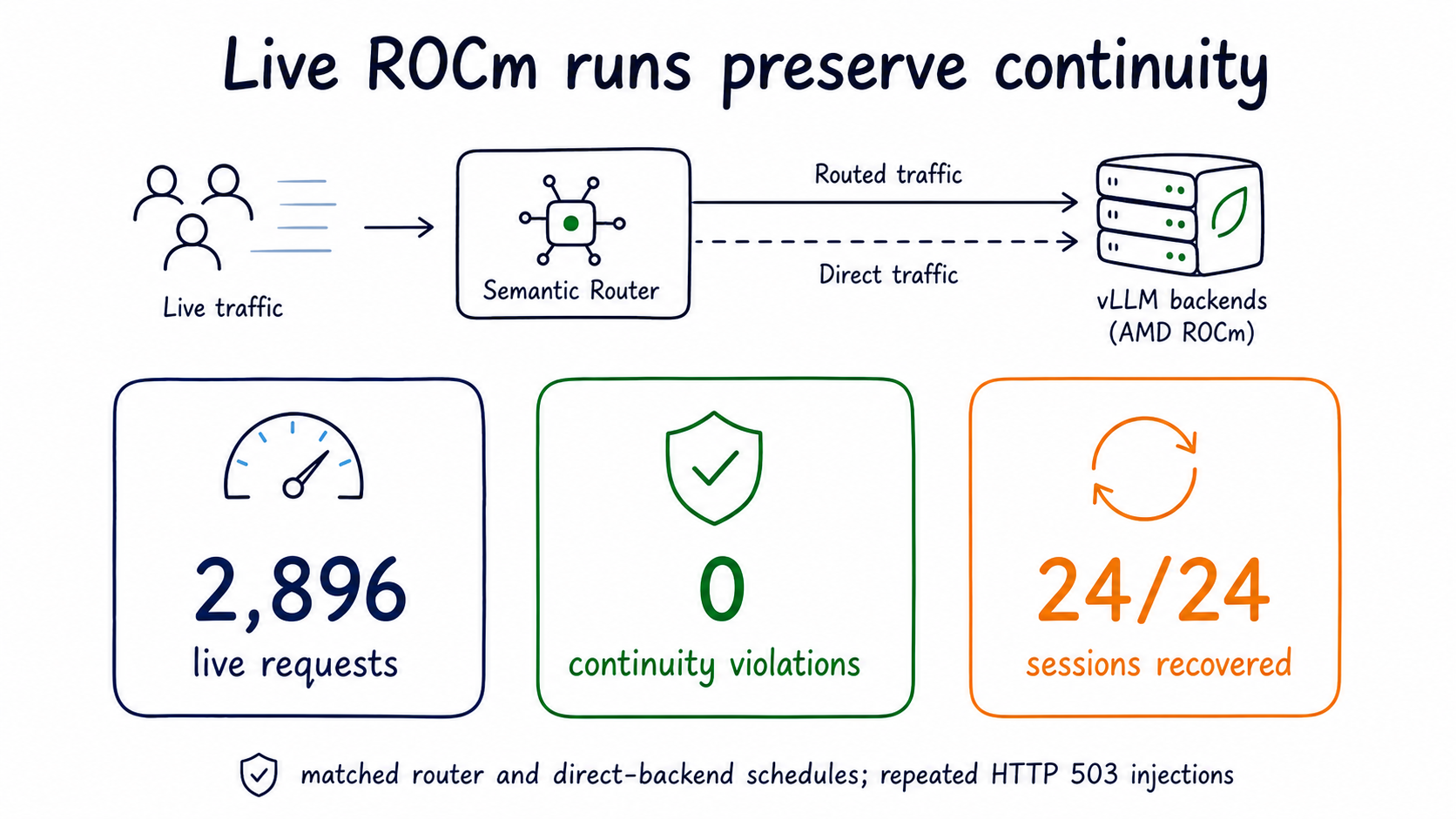
Validation should prove route intent, learning behavior, replay visibility, and backend cache evidence.
What You Get
This guide is not a benchmark for one checkpoint. It is a deployment pattern:
- vLLM on AMD ROCm serves the local model backend.
- vLLM Semantic Router turns
model: autointo explicit route policy. - The recipe expresses simple, complex, privacy, and domain decisions.
- Router Learning protects either one conversation or the whole session.
- Privacy and security decisions can bypass learning.
- Inferoa gives an agent-facing view of the selected route, learning action, cache evidence, and token pressure while you work.
The result is not a sticky-session load balancer. It is an agent-aware router: it can say "this request looks simple" and still decide "do not switch right now" when a tool loop, session policy, or prefix-cache checkout says continuity is the better route.