Configure models with Ollama
Ollama is a simple way to run local LLMs without a full vLLM or GPU stack. Ollama exposes an OpenAI-compatible API on port 11434, which Semantic Router can use as a model backend during first-run setup or in hand-authored YAML.
This guide walks through:
- Installing Ollama and pulling a model on your host
- Verifying the Ollama API
- Registering the model in the Semantic Router setup dashboard
- Activating the config and sending a test request
Semantic Router runs in Docker during vllm-sr serve. Point the router at host.docker.internal:11434, not localhost:11434, so the container can reach Ollama on your host.
Prerequisites
- Semantic Router installed and runnable with
vllm-sr serve(Linux, macOS, or WSL2 with Docker) - Ollama installed on the same machine that runs Docker
- Enough disk space for at least one model (for example,
llama3.2:3bis about 2 GB)
1. Install Ollama
Install Ollama from ollama.com/download for your platform, then confirm the CLI is available:
ollama --version
On Linux you can also use the install script:
curl -fsSL https://ollama.com/install.sh | sh
Ollama starts a background service automatically. It listens on http://127.0.0.1:11434 by default.
2. Pull a model
Pull a model tag from the Ollama library. This example uses llama3.2:3b, a small general-purpose model that works well for local testing:
ollama pull llama3.2:3b
List locally available models:
ollama list
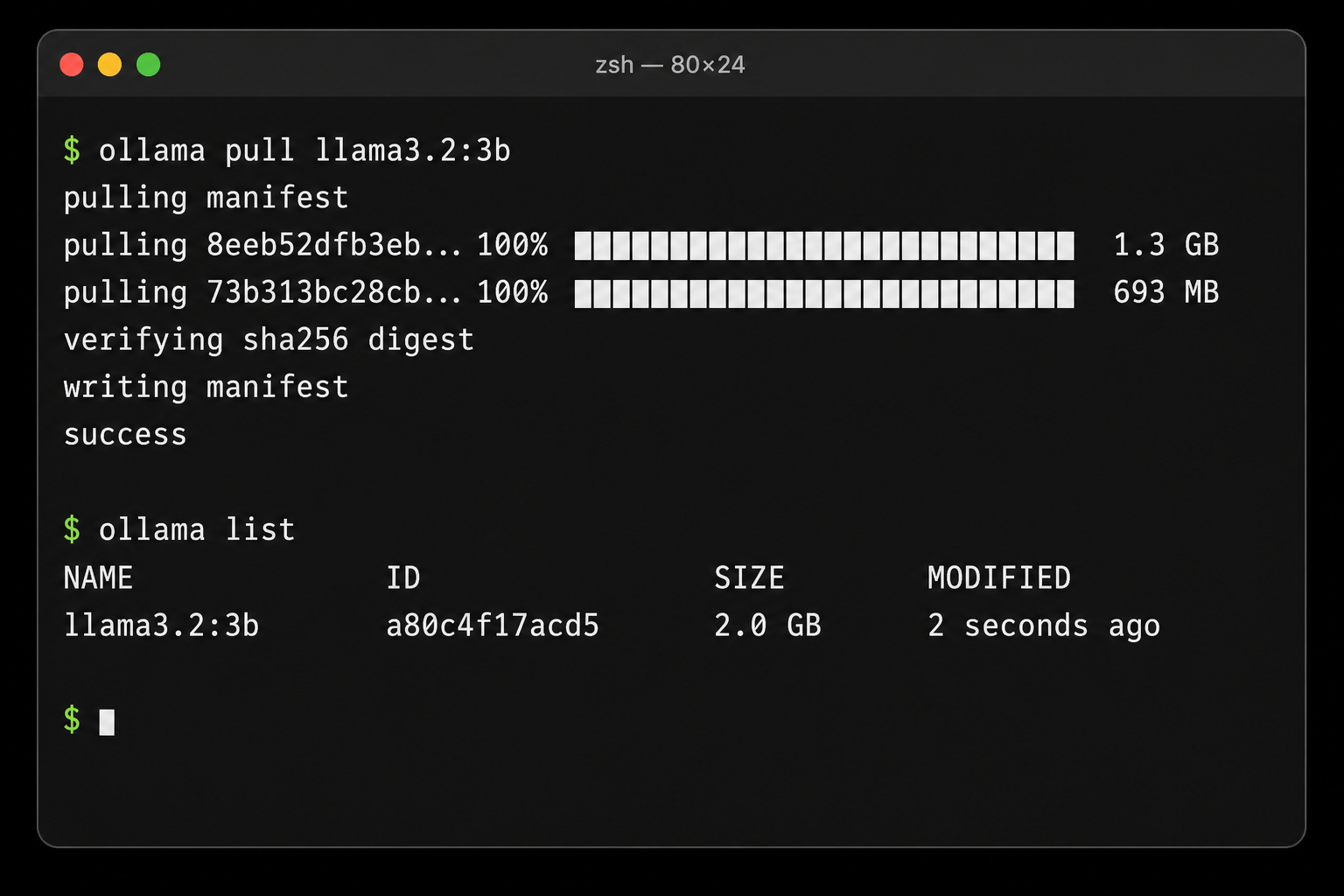
Use the exact Ollama tag (for example llama3.2:3b, qwen2.5-coder:7b) as the model name in Semantic Router. The router forwards that name to Ollama unchanged.
3. Verify Ollama is serving
Before opening the Semantic Router dashboard, confirm Ollama responds on the host:
curl http://localhost:11434/v1/models
Send a quick chat completion:
curl http://localhost:11434/v1/chat/completions \
  -H "Content-Type: application/json" \
  -d '{
    "model": "llama3.2:3b",
    "messages": [{"role": "user", "content": "Say hello in one sentence."}]
  }'
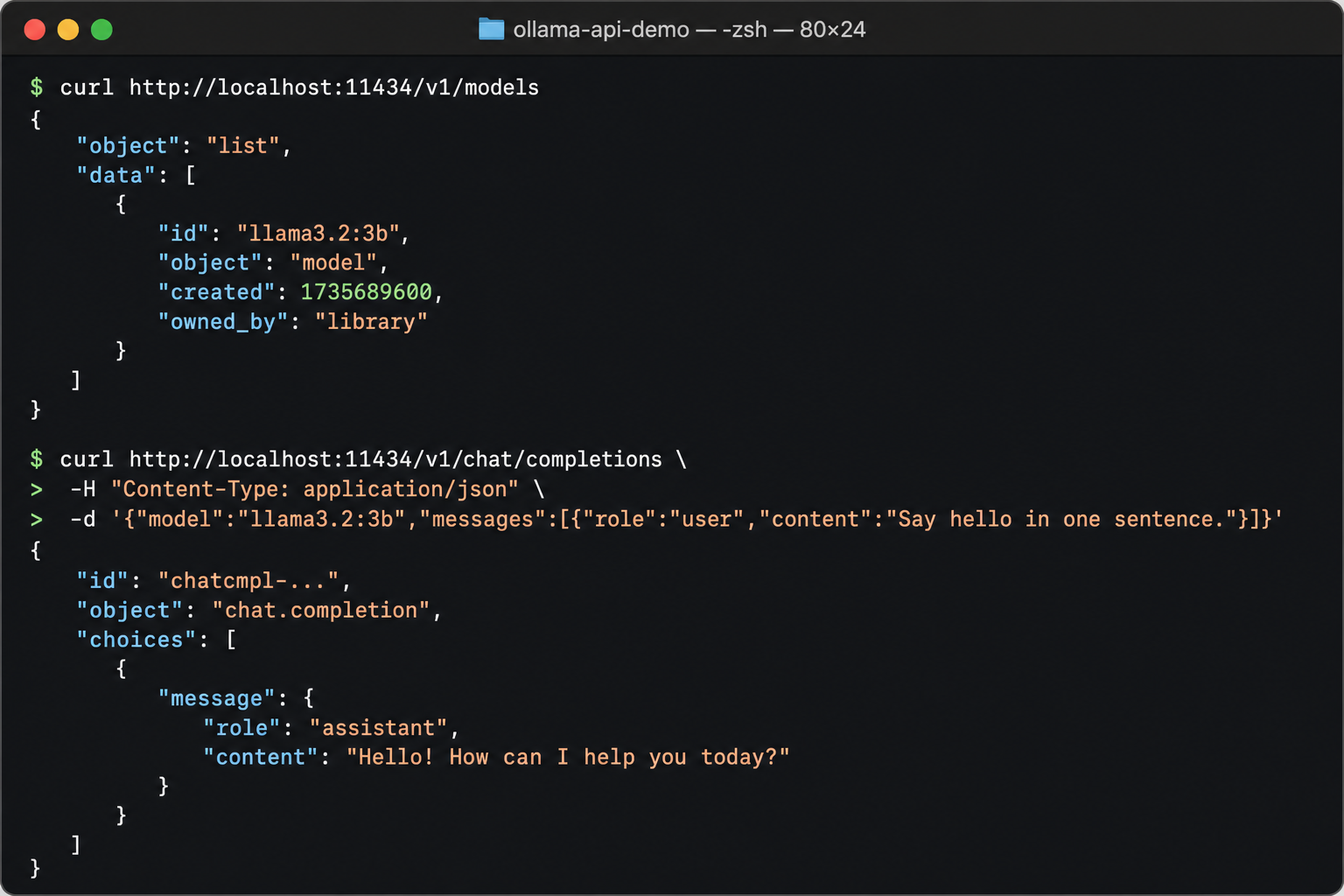
If either command fails, fix Ollama on the host before continuing. Semantic Router cannot reach a backend that is not already serving on port 11434.
4. Configure the model in the setup dashboard
Start Semantic Router (or use the instance already started by the installer):
vllm-sr serve
If config.yaml does not exist yet in the current directory, the dashboard opens in setup mode at http://localhost:8700.
On Step 1 — Connect model, register your Ollama model:
| Field | Value |
|---|---|
| Model name | Your Ollama tag, for example llama3.2:3b |
| Provider | Local vLLM |
| Base URL or host | host.docker.internal:11434 |
| Endpoint label | primary (or any short label) |
| Default | Select this model if it is your only backend |
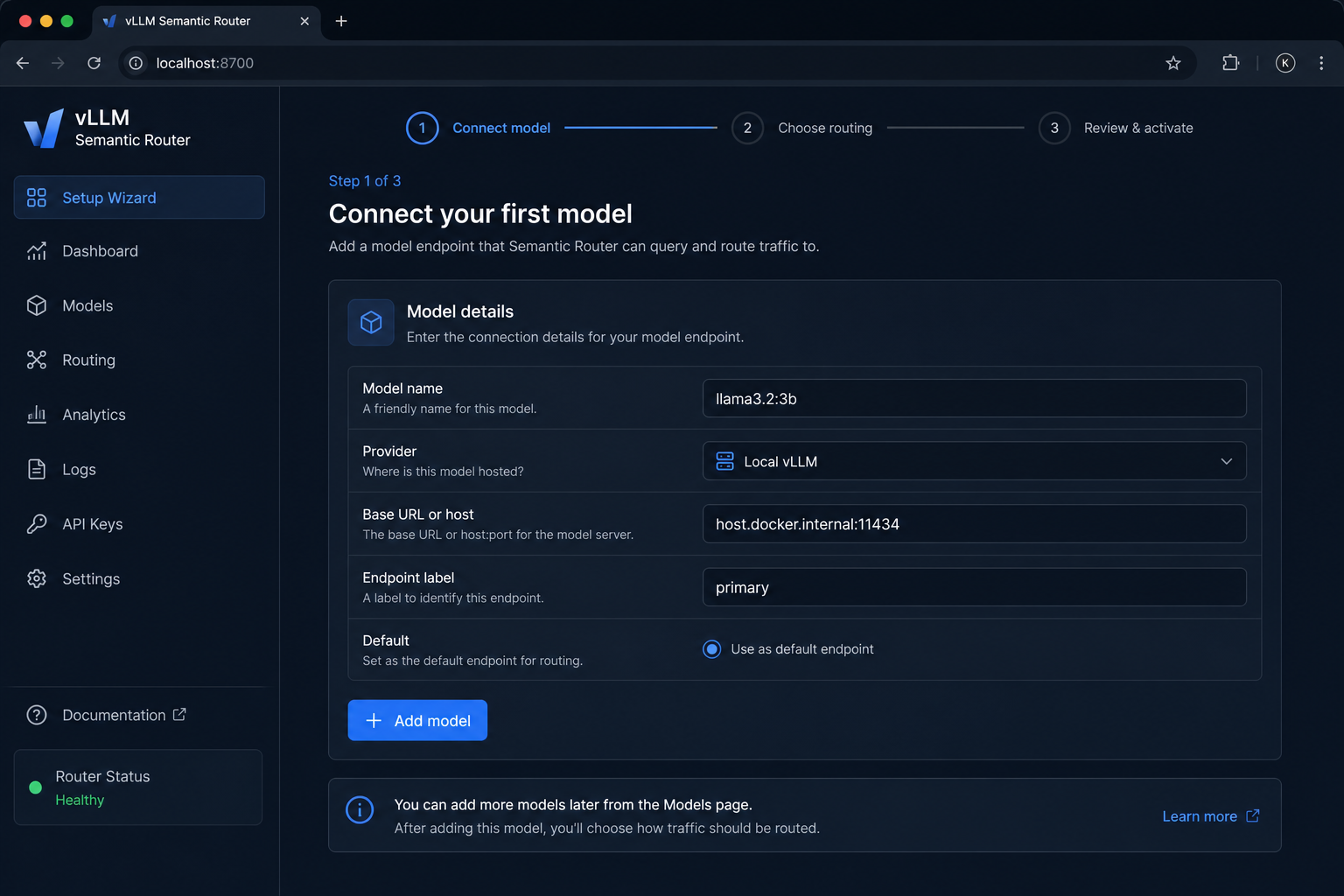
Why Local vLLM and not OpenAI-compatible API?
- Ollama serves an OpenAI-compatible surface at
/v1/chat/completions. - The Local vLLM provider type matches how other local backends are configured in
vllm-sr serveand resolves tohost.docker.internal:11434inside the generatedconfig.yaml.
Alternative: you can choose OpenAI-compatible API and set the base URL to http://host.docker.internal:11434/v1. Both paths work; pick one and stay consistent when adding more models.
Click Continue when the model card validates.
5. Choose routing and activate
On Step 2 — Choose routing, keep the Single-model baseline if you only registered one Ollama model. You can import a preset or remote config later when you add more backends.
On Step 3 — Review & activate, confirm the model summary, then click Activate configuration.
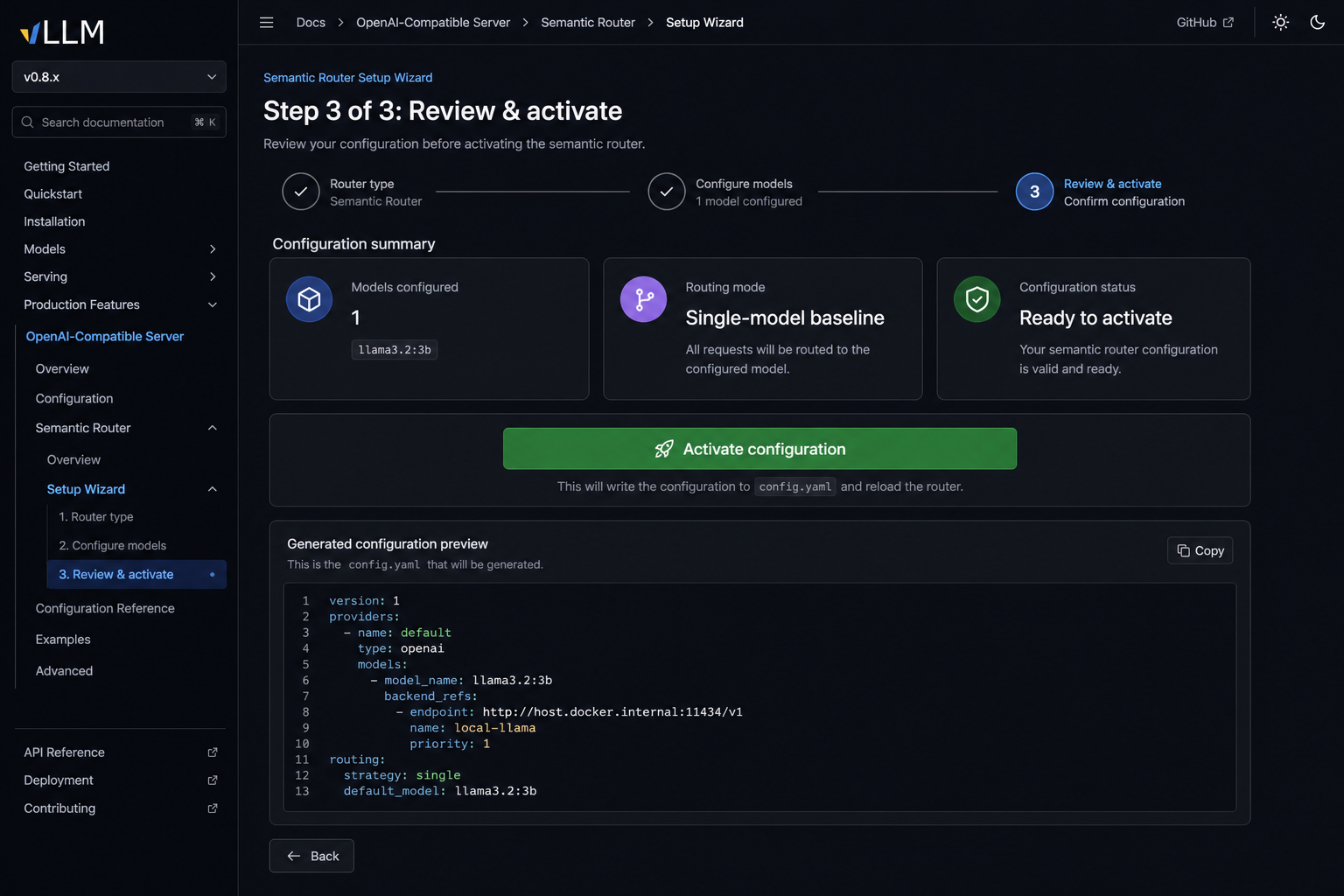
Activation writes config.yaml to the current directory and exits setup mode. Envoy starts on port 8888 and routes requests through Semantic Router to your Ollama backend.
6. Test through Semantic Router
Send a request through the router proxy:
curl http://localhost:8888/v1/chat/completions \
  -H "Content-Type: application/json" \
  -d '{
    "model": "llama3.2:3b",
    "messages": [{"role": "user", "content": "Hello from Semantic Router!"}]
  }'
If you kept the default single-model baseline, you can also use the auto-routing alias:
curl http://localhost:8888/v1/chat/completions \
  -H "Content-Type: application/json" \
  -d '{
    "model": "MoM",
    "messages": [{"role": "user", "content": "Hello from Semantic Router!"}]
  }'
A JSON chat completion response means Ollama is wired correctly.
YAML configuration (advanced)
If you prefer to edit YAML directly instead of the dashboard, add a model entry like this:
version: v0.3

providers:
  defaults:
    default_model: llama3.2:3b
  models:
    - name: llama3.2:3b
      provider_model_id: llama3.2:3b
      api_format: openai
      backend_refs:
        - name: local-ollama
          endpoint: host.docker.internal:11434
          protocol: http
          weight: 100

routing:
  modelCards:
    - name: llama3.2:3b
  decisions:
    - name: default-route
      description: Route all requests to the local Ollama model.
      priority: 100
      rules:
        operator: AND
        conditions: []
      modelRefs:
        - model: llama3.2:3b
          use_reasoning: false
Validate and serve:
vllm-sr validate config.yaml
vllm-sr serve --config config.yaml
Troubleshooting
Router cannot reach Ollama
- Use
host.docker.internal:11434in config, notlocalhost:11434. Inside the router container,localhostrefers to the container itself. - On Linux,
vllm-sr serveadds--add-host=host.docker.internal:host-gatewayautomatically. If connectivity still fails, see Container connectivity. - Confirm Ollama responds on the host:
curl http://localhost:11434/v1/models.
Model not found or 404 from Ollama
- The Model name in Semantic Router must match the Ollama tag exactly (
llama3.2:3b, notllama3.2). - Run
ollama listand pull the tag if it is missing:ollama pull <tag>.
Slow first request
- Ollama loads models on demand. The first request after idle time may take longer while weights are loaded into memory.
Reasoning models (Qwen3 and similar)
- Some reasoning models spend the full token budget on internal thinking when called through Ollama's OpenAI-compatible endpoint. For advanced local setups with Qwen3-style models, see
bench/grounded_fusion/ollama_proxy.pyin the repository.
Next steps
- Add more backends and turn on semantic routing presets in the dashboard
- Read the Configuration guide for decisions, signals, and model cards
- See the agentgateway homelab blog post for a multi-model setup that includes local Ollama